IT Help Desk
Overview
To get in contact with IT, we have setup a Help Desk via an Atlassian service called Jira. This creates a ticket that helps IT track all work, and allows you to communicate directly with us conveniently.
IT is responsible for:
- Vulog Communications and problems (including Evie app)
- Hardware/software/staff needs related to technology
- Creation of promo codes
- Data requests
There are 2 ways to use the Help Desk: via the portal, or direct email. Both ways create a ticket for IT, so it is totally up to user preference as to which path to take.
Create ticket via email
The direct email is support@hourcar.org.
The subject of your email will become the title of your ticket. Include any information about your issue/question/need in the body of your email. If anyone else is involved, CC'ing them as a recipient of your email will automatically add them as a request participant to the ticket, and IT will be able to communicate directly with all parties.
This is the simplest way to open an issue with IT, and keeps it simple in the lifecycle of the ticket.
Create ticket via Portal
You will notice that in the portal, there are pre-determined selections present to make it easier to get you in the right pipeline. Some of these options are for very specific usage, and some are designed to help anyone who may be in need of whatever issue they might have. If unsure of which form to use, Submit a request or incident is a good default.
Click on the correct choice for your situation, and follow the prompts on the screen. The more information you can provide, the more helpful it is for IT, so feel free to share whatever you think might be related!
Form Requests
One type of request you can make in the portal will be a populating form. Current examples of this include Promo Code Request and Request an Evie App Notification.
IT utilizes the forms to ensure we receive all of the pertinent information appropriately; for use cases that are standardized and often repeated with HOURCAR. When requesting something via the forms, please ensure accuracy to the question; and reach out if you are unsure. After the form is sent to IT; you will be able to see your responses by expanding the form in the portal view.
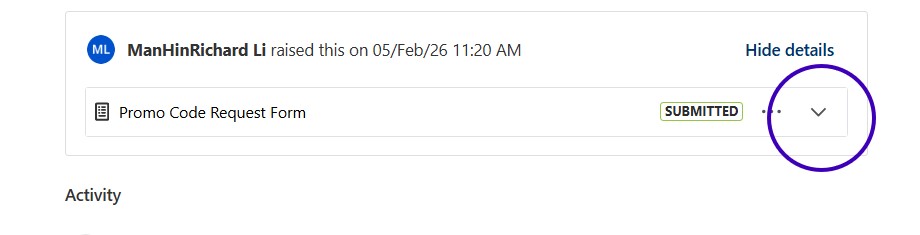
Promo Code Request
The Promo Code Request has an automation attached to it that instantly creates the requested Code in Vulog's BO, in addition to creating the Help Desk ticket and sharing it with the related parties. Please ensure accuracy regarding your data on this form specifically.
Other Portal Information
The portal is also designed to allow you to see tickets that you have opened or have been shared with you. To utilize this function, locate the menu associated with your account at the top right corner, and click on "Requests".
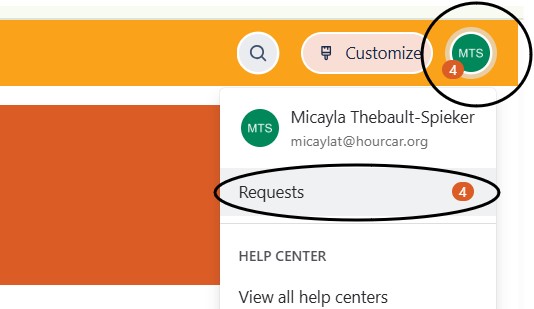
This will take you to a page which shows you by default, all of your open tickets. You will be able to see the reference number, the Summary, Status, and other helpful information.
Of note, you can also filter here! Options include filtering via ticket status, or created/shared with status. If you are part of a large number of tickets you might also find the search bar helpful.
IT views the portal as especially helpful to staff members who work on teams that have a lot of historical information that informs future actions: being able to search for closed tickets and remind yourself of the situation, or look up a specific promo code can be very valuable.
Organizations
If you are a member of a team with a large amount of coworkers, or work that impacts a large number of folks, you may be added to an "Organization" within the Help Desk.
Organizations are a tool that allow anyone added to the Organization to see any tickets assigned there, via the portal. Organizations are especially helpful to make sure all team members are informed of the details of a specific items.
Current active Organizations within HOURCAR are Member Services and Promos.
Member Services Organization
The Member Services team often can have functions that require a "group brain", and this allows any tech/IT related issues to be viewed, seen, and kept up-to-date by all MS members. If there is anything that is member and IT related, creating a MS Help desk ticket ensures that all MS members have the information they need.
Note: In the case of MS, the Infobox email is also included in this Organization.
Promos Organization
The Promos team exists to ensure that all pertinent team members have the information about promo code campaigns, in a cross-departmental manner. These tickets are created via the Promos option within the Portal, and are shared with Marketing, IT, MS, and Engagement staff. They track the specific Promo code in BO, what it's details are (amount/dates/etc), and how it is going to be used. Please refer to Promo Code Request information for specific details on use.
Data Requests
Data requests can be created in the Help Desk as well. Because we are a small department, the time frames may not be immediate. If this is a higher priority request, please identify that in the your ticket, so that Noah can communicate directly about workloads.
IT emergent issues (service failures)
In the case of an issue with service-specific outages/concerns (members cannot book cars, etc.), you may need to contact the IT department manager directly via cell phone. Please refer to the Outage Procedures in this case.
For all other issues, our standard working hours are 9a-5p M-F.
Summary
For anything that is related to support from the IT Department, opening a Help Desk ticket is the best way to get in contact with us.
If for some reason a request comes through in a different way, you may notice that we open a ticket on your behalf, and communciate with you via the Help Desk.
This helps us keep track of all the requests, and ensures that we respond in as timely manner as possible.
We are always here to help, and so if you are unsure, open a ticket! If we don't have the answer, we will work to find it, or direct you to the correct location to get it.